
Last week we encountered an unexpected issue in one of our assemblies. It consists of two plates bolted together with a linear bolt pattern. During assembly, we found that the hole patterns did not align. By the final hole, the centerline mismatch had grown to 10 mm.
At first, this appeared to be a typical modeling or constraint error. However, the actual root cause proved to be far more subtle.
The setup
Both plates use a calculated pitch for their bolt patterns. Although the input values were identical, the pitch was computed using two different methods.
For the first plate, the pitch was defined directly as a parameter using this expression:
round(length / (NumberOfHoles * 1 mm)) * 1 mm
For the second plate, the pitch was calculated in an iLogic rule:
Parameter("pitch") = Math.Round(length / NumberOfHoles)
The results were not the same:
- The first method produced a pitch of 243 mm.
- The second method produced a pitch of 242 mm.
A 1 mm difference seems trivial until it repeats across ten holes. By the end of the pattern, the accumulated error was exactly 10 mm.
Why the parameter formula looks so complicated
The issue is not Inventor being inconsistent. It comes down to how rounding and units are handled in different contexts.
At first glance, the parameter expression looks more complex than necessary. In reality, every part of it exists for a specific reason.
The round function requires a unitless parameter as an argument. [Link]
In this setup, the parameters are:
- length → mm
- NumberOfHoles → ul (unitless)
If we compute:
length / NumberOfHoles
the result has units of mm, which the round function does not accept. To work around this, NumberOfHoles is multiplied by 1 mm:
length / (NumberOfHoles * 1 mm)
This produces a unitless result, which is accepted by round. However, since the pitch must ultimately be in millimeters, the rounded value is multiplied by 1 mm afterward:
round(length / (NumberOfHoles * 1 mm)) * 1 mm
If the round function were able to accept inputs with units of mm, the expression could simply be:
round(length / NumberOfHoles)
which is notably similar to the iLogic expression:
Math.Round(length / NumberOfHoles)
The difference is not intent, but how units are handled behind the scenes.
Midpoint rounding strategies
Rounding is most commonly done by rounding .5 up to the next whole number. While this works well for individual values, it can introduce a systematic bias when rounding large datasets.
When millions of numbers are rounded this way, the small upward bias accumulates and results in a measurable error. This is particularly important in fields like banking and finance, where even tiny rounding differences can add up to significant amounts over time, potentially creating unintended gains or losses.
Because of this, several rounding strategies have been developed. For example .Net knows the following strategies:
| Name | Description |
|---|---|
| ToEven | The strategy of rounding to the nearest number, and when a number is halfway between two others, it's rounded toward the nearest even number. |
| AwayFromZero | The strategy of rounding to the nearest number, and when a number is halfway between two others, it's rounded toward the nearest number that's away from zero. |
| ToZero | The strategy of directed rounding toward zero, with the result closest to and no greater in magnitude than the infinitely precise result. |
| ToNegativeInfinity | The strategy of downwards-directed rounding, with the result closest to and no greater than the infinitely precise result. |
| ToPositiveInfinity | The strategy of upwards-directed rounding, with the result closest to and no less than the infinitely precise result. |
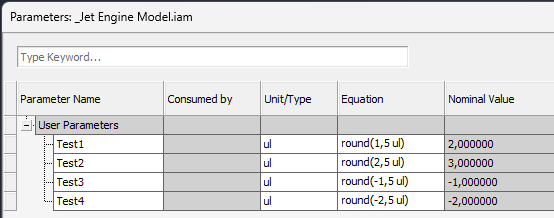
The issue we encountered was caused by different rounding strategies. Inventor uses the ToPositiveInfinity rounding strategy for parameters,
while iLogic uses the ToEven rounding strategy.
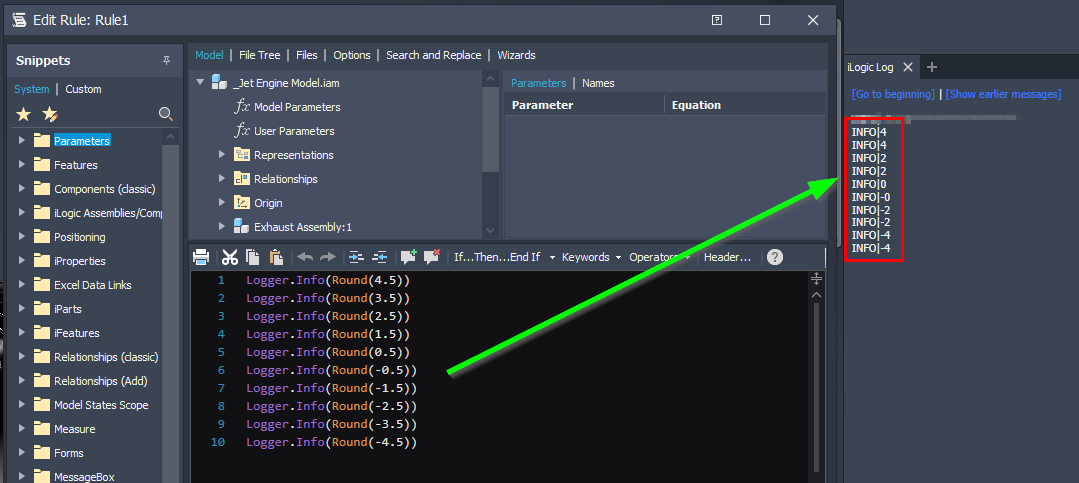
In our case, we were rounding the value 242.5, which led to different results:
- Inventor rounded the pitch up to 243 mm.
- iLogic rounded the pitch down to 242 mm.
This mismatch explains why two seemingly equivalent calculations produced different pitches and ultimately caused the misalignment.
Solution and workaround
We can explicitly control how iLogic rounds values by using the additional arguments of the Math.Round function. That would look like this:
Dim pitch = length / NumberOfHoles
Parameter("pitch") = Math.Round(pitch, MidpointRounding.ToPositiveInfinity))
This is arguably the most correct and explicit solution, as it aligns iLogic’s behavior with Inventor’s parameter rounding. However, it is also a bit verbose.
In our case, we opted for a simpler and more consistent approach by flooring the values in both the parameter editor and iLogic:
Parameter("pitch") = Math.Floor(length / NumberOfHoles)
This approach worked well for our design and ensured that both calculations produced identical results.
Final quirk
Since I had already gone down the rabbit hole, I decided to dig a bit deeper and discovered an even stranger behavior in Inventor’s parameter round function. Check out how inventor round these values.

Based on everything discussed so far, you might expect:
round(1.4999996) → 1, because 1.4999996 < 1.5
However, Inventor rounds this value to 2.
My first assumption was that Inventor internally rounds floating‑point values to six decimal places before applying the round function. That explanation almost works, but it falls apart when you consider this case:
round(1.4999995) → 1
Here, I would have expected the value to round up to 2 as well, yet it does not.
At that point, the rabbit hole goes deeper than I am willing to follow. Fortunately, this inconsistency is so edge‑case‑specific that I do not expect anyone to run into real‑world issues because of it.